

 Image 1 of 1
Part Description:
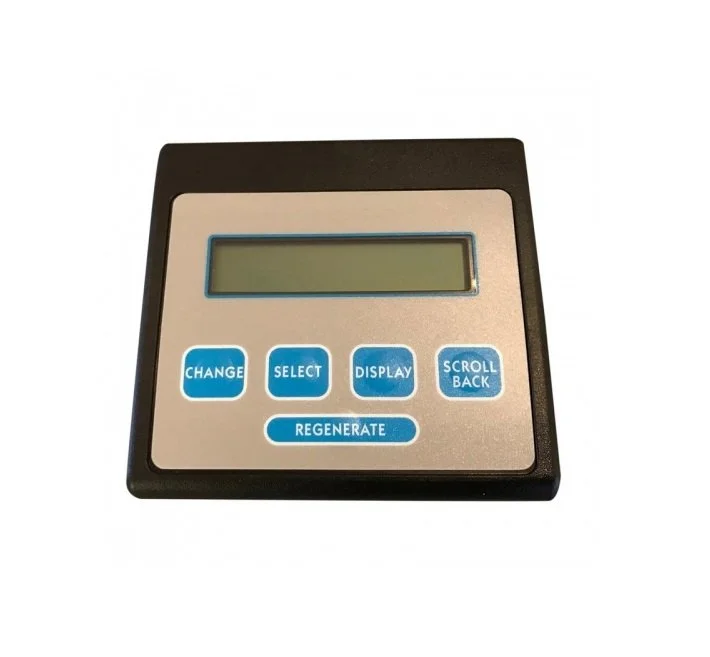
The 5-Button Computer Controller is the main electronic display and control panel on the AquaMaster water softener. It has five buttons used to program and monitor the system.
Function & Importance:
Allows users to set the time, hardness level, and regeneration cycle
Shows real-time information like water flow, regeneration countdowns, and alerts
Remembers your custom settings, even if the power goes out
Communicates with the turbine sensor, motor and magnet disk to help the softener to run properly
Common Signs of Issues:
Blank or faded display
Buttons not responding
System may show the wrong time, water usage, or regeneration status
Error Codes or Flashing Lights
Compatible Models:
AquaMaster 700, 900, and 950
Installation Tips:
Always unplug the transformer (disconnect the power) first
Avoid static or moisture contact when installing
Ensure the sensor wire and transformer are fully seated
Double-check time, hardness, and salt settings once installed
Why It Matters:
The 5-Button Computer Controller is the "brain" of the AquaMaster softener. Without it, the unit can’t run properly or adjust to your household’s water needs. A working controller ensures efficient performance, easy operation, and long-term reliability of your softener. Please call technical support first to ensure this is the correct part for the issue your softener may be experiencing 1-800-437-8993 (EST).
Part Description:
The 5-Button Computer Controller is the main electronic display and control panel on the AquaMaster water softener. It has five buttons used to program and monitor the system.
Function & Importance:
Allows users to set the time, hardness level, and regeneration cycle
Shows real-time information like water flow, regeneration countdowns, and alerts
Remembers your custom settings, even if the power goes out
Communicates with the turbine sensor, motor and magnet disk to help the softener to run properly
Common Signs of Issues:
Blank or faded display
Buttons not responding
System may show the wrong time, water usage, or regeneration status
Error Codes or Flashing Lights
Compatible Models:
AquaMaster 700, 900, and 950
Installation Tips:
Always unplug the transformer (disconnect the power) first
Avoid static or moisture contact when installing
Ensure the sensor wire and transformer are fully seated
Double-check time, hardness, and salt settings once installed
Why It Matters:
The 5-Button Computer Controller is the "brain" of the AquaMaster softener. Without it, the unit can’t run properly or adjust to your household’s water needs. A working controller ensures efficient performance, easy operation, and long-term reliability of your softener. Please call technical support first to ensure this is the correct part for the issue your softener may be experiencing 1-800-437-8993 (EST).